
Connections
A connection stores the hostname, port, username, authentication settings, bastion route, and tags for a remote server. You can manage connections from the command line or using the desktop application.
Save a connection
Section titled “Save a connection”Run bssh add with a friendly name and the target hostname or IP address:
bssh add web-prod web.example.com -u deploySpecify custom ports, private keys, or Kerberos authentication when adding the host:
# Custom port and identity filebssh add db01 10.0.1.5 -p 2222 -i ~/.ssh/id_ed25519
# Route through a bastion host with Kerberosbssh add internal-api api.internal -b bastion.example.com -B jumpuser -k true
Assign tags using -t or --tags. Pass multiple flags or separate values with commas:
# Repeatable flagsbssh add staging-app 10.0.2.10 -t staging -t backend
# Comma-separated tagsbssh add staging-app 10.0.2.10 -t staging,backend| Flag | Description |
|---|---|
-u, --user <USER> |
SSH username (falls back to config default or $USER). |
-p, --port <PORT> |
SSH port (defaults to configured default, usually 22). |
-i, --key <FILE> |
Path to an SSH private key. |
-b, --bastion <HOST> |
Bastion or jump host to route through. |
-B, --bastion-user <USER> |
Username for the bastion host. |
--no-bastion |
Mark as direct connection (ignores default bastion). |
-k, --kerberos <BOOL> |
Enable Kerberos (true or false). |
-t, --tags <TAG> |
Tags for grouping and filtering (repeatable or comma-separated). |
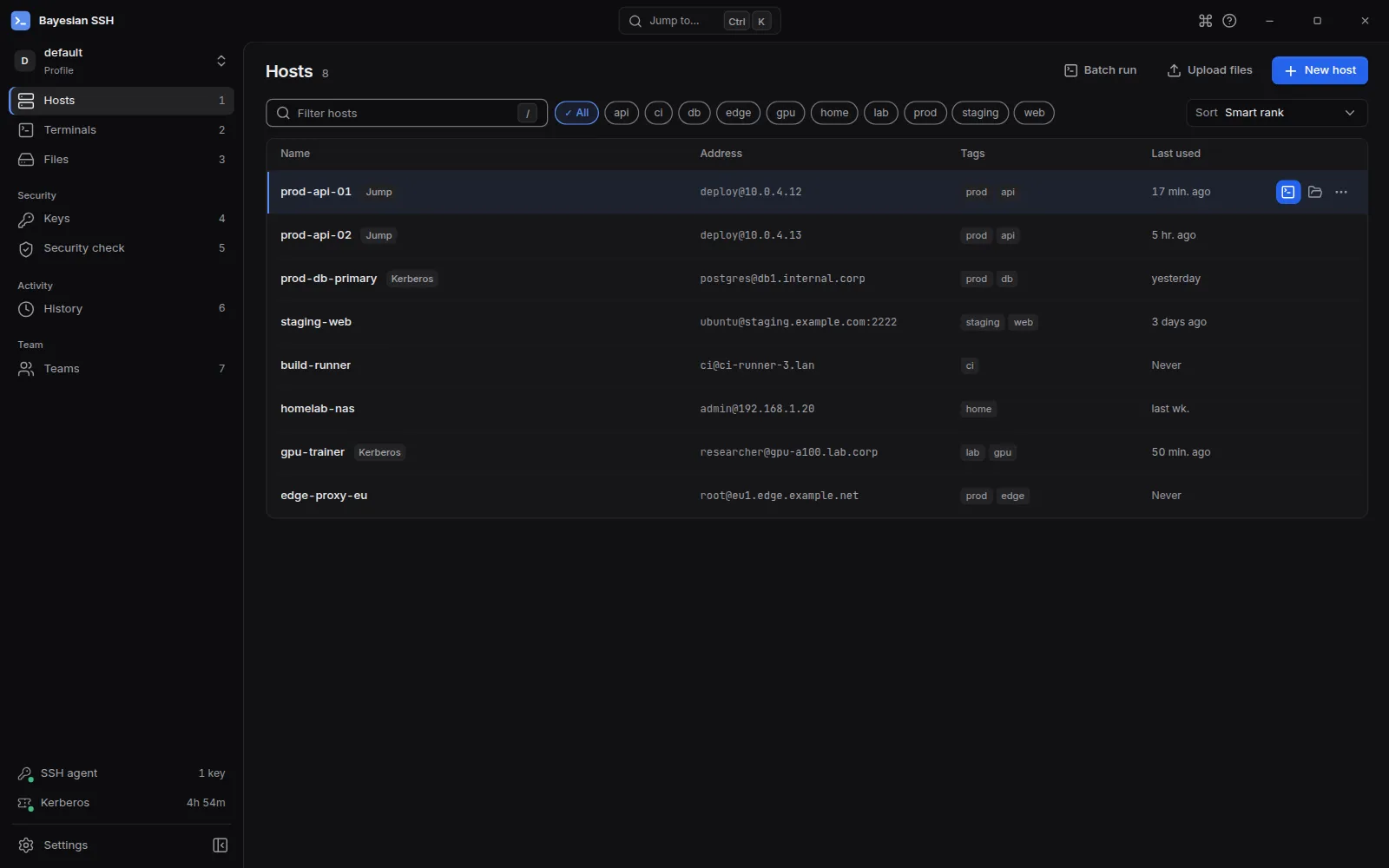
bssh add web-prod web.example.com -u deploy -t prod,webClick New host in the toolbar or press Ctrl+N (Cmd+N on macOS) to open the connection form.
List connections
Section titled “List connections”Run bssh list to display all saved connections in the active environment. Results are ranked by Bayesian score, placing your most frequently and recently used hosts at the top:
bssh list🔗 Connections══════════════════════════════════════════════════════════════════════# NAME HOST PORT INFO──────────────────────────────────────────────────────────────────────1 web-prod deploy@web.example.com 22 [prod,web]2 db01 postgres@10.0.1.5 2222 [db,prod]──────────────────────────────────────────────────────────────────────Total: 2 connection(s)Filter connections by tag or recency, or display full configuration details:
# Show only connections with the prod tagbssh list -t prod
# Show only recently used connectionsbssh list --recent
# Show full connection details including ID, bastion, and keysbssh list --detailed
View connection details
Section titled “View connection details”Run bssh show to inspect the full configuration of a saved connection. Pass a connection name, alias, or ID:
bssh show web-prod🔗 Connection Details: web-prod
ID: 9a699d0b-7607-4ee2-8ebc-1f00596ed6d1 Host: web.example.com:22 User: deploy Kerberos: Disabled Created: 2026-10-23 08:39:36 UTC Tags: prod, web
SSH Command: ssh -p 22 deploy@web.example.comThe output displays all stored fields and the exact ssh command bssh constructs when establishing the session.
Edit a connection
Section titled “Edit a connection”Run bssh edit to modify existing settings. Only the flags you pass are updated; all other fields remain unchanged:
# Update SSH username and portbssh edit web-prod --user deployer --port 2200
# Change the bastion hostbssh edit db01 --bastion jump.example.com
# Remove a bastion and switch to a direct connectionbssh edit db01 --no-bastion
Update tags using --add-tags and --remove-tags:
# Add canary and remove legacy tagsbssh edit staging --add-tags canary,api --remove-tags legacy| Option | Description |
|---|---|
--name <NAME> |
Rename the connection. |
--host <HOST> |
Change hostname or IP address. |
--user <USER> |
Change SSH username. |
--port <PORT> |
Change SSH port. |
--key <FILE> |
Set or change the SSH private key path. |
--bastion <HOST> |
Set or change the bastion host. |
--bastion-user <USER> |
Change the bastion username. |
--no-bastion |
Remove bastion and route directly. |
--kerberos <BOOL> |
Enable or disable Kerberos (true or false). |
--add-tags <TAG> |
Add tags (repeatable or comma-separated). |
--remove-tags <TAG> |
Remove tags (repeatable or comma-separated). |
Duplicate a connection
Section titled “Duplicate a connection”Run bssh duplicate to create a copy of an existing connection under a new name. All attributes—including port, user, keys, bastions, and tags—are preserved:
bssh duplicate web-prod web-stagingAfter duplicating, use bssh edit to adjust the hostname or environment tags:
bssh edit web-staging --host staging.example.com --add-tags staging --remove-tags prodTest reachability
Section titled “Test reachability”Run bssh ping to test SSH connectivity without opening an interactive session. bssh connects over TCP and performs an SSH handshake in batch mode:
# Test a single hostbssh ping web-prod
# Test all saved connections in parallelbssh ping --all
# Test hosts matching a specific tagbssh ping -g prod -t 10
bssh ping respects jump hosts and interactive bastions configured on each host. The -t or --timeout option sets the connection timeout in seconds (default: 5).
Group connections with tags
Section titled “Group connections with tags”Tags allow you to organize hosts by role, region, or environment. Run bssh groups to list all existing tag groups and the number of connections in each:
bssh groupsAvailable groups: - prod (5 connections) - staging (2 connections) - web (3 connections)
Use `bssh groups <name>` to see connections in a group.To list all connections that belong to a specific group, provide the group name:
bssh groups prodConnections in group 'prod': - web-prod (deploy@web.example.com) - db-prod (postgres@db.example.com)Remove connections
Section titled “Remove connections”Run bssh remove to delete a saved connection. Pass the connection name, alias, or ID:
bssh remove web-prodbssh displays the host details and asks for confirmation. Pass -f or --force to skip the prompt:
bssh remove web-prod -fYou can remove multiple connections at once by tag:
# Delete all connections tagged stagingbssh remove -t stagingbssh lists all matching connections and the total count before requesting confirmation. To delete immediately without prompting, add -f:
bssh remove -t staging -f