
Audit log
The audit log records who connected to which team host, and when. Each member’s device writes its own events and signs them, and admins verify the whole log on their own machine instead of trusting the server.
What is recorded
Section titled “What is recorded”Connecting to a team host records a session started event locally, even offline and while Teams is locked. The event needs no passphrase: at the next sync, the device signs it with its key, chains it to the device’s previous event and uploads it, with the time the session actually started.
The server adds when it received each event and the address it came from. Those two fields let you compare what a device reported with what the server saw.
View the log
Section titled “View the log”Admins read the log with bssh teams audit:
bssh teams audit platformbssh teams audit platform --host db-prod@platformbssh teams audit platform --member ana@example.com --since 2026-01-01| Option | What it narrows |
|---|---|
--host <CONNECTION> |
Events for one team connection |
--member <EMAIL> |
Events by one member |
--since <DATE> |
Events that happened since a date (YYYY-MM-DD) or an RFC 3339 time |
--limit <LIMIT> |
How many events to fetch, newest first (default and maximum: 1000) |
The command shows each event’s time, member and device, event, host, source address and check result. On the command line, times use the machine’s local time. The desktop app shows them in UTC.
Verification
Section titled “Verification”Every event is verified on your machine: its signature against the author device’s key, and each device’s chain against the event before it. Nothing is trusted from the server.
- An edited or forged event fails its signature check.
- An event from a device the team does not know shows as Unknown device.
- An event that belongs to another team shows as Other team.
- A reordered or duplicated event breaks its device’s chain, and a deleted one leaves a gap.
When anything fails, bssh teams audit prints the problems and exits non-zero, so the command can run in a compliance check.
The newest-events limit
Section titled “The newest-events limit”The log is fetched newest first, 1000 events by default and at most 1000 with --limit. If the fetch reaches the limit, the command says it is showing the newest events only. The events it did fetch are still verified, but older ones were not checked; narrow with --since or --host to cover them.
One limit cannot be detected from the log alone. If the server drops a member’s newest events before that member uploads anything more recent, what remains is still a valid log. The member’s next sync then reports an audit-chain error. The desktop app keeps that warning on screen, and on the Teams entry in the sidebar, until a later sync succeeds. On the command line, watch for the audit-chain message after a sync.
In the desktop app
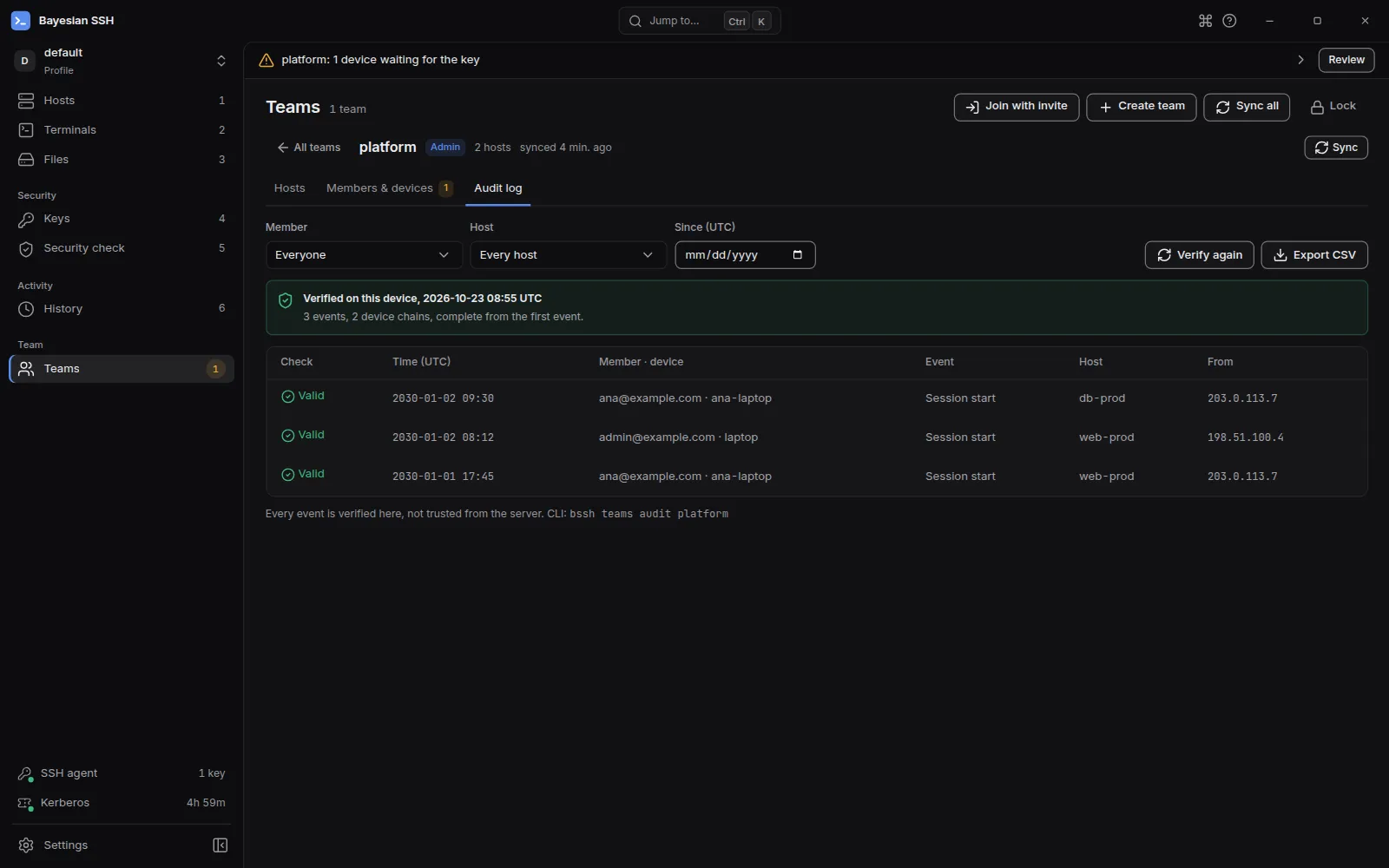
Section titled “In the desktop app”Open the team and choose Audit log. The tab verifies the log as soon as it opens, and again whenever you change a filter or choose Verify again. Admins only.
The banner gives one of three verdicts:
- Verified on this device: every event checked, from each device’s first one.
- Verified, partial: older events weren’t checked: the events shown are valid, but older ones were not checked, because only the newest were fetched or the log does not start at a device’s first event.
- Verification failed: treat this log as tampered: the problems are listed; check the log on another admin machine before trusting the rows.
Filter by Member, Host and Since (UTC), and choose Export CSV to keep a copy. The Check column says Valid, Bad signature, Unknown device or Other team for each event. Times are in UTC.
Next steps
Section titled “Next steps”- Sync uploads queued events and reports a broken chain.
- Members and devices for roles and fingerprints.